/Afbeeldingen/Mysolution%20Logo.png?width=150&height=113&name=Mysolution%20Logo.png)
In this release, we introduce an improved way for candidates to reschedule and cancel appointments. The new functionality provides a clearer process, an improved user experience, and prevents multiple candidates from reserving the same time slots. In addition, the screen layout has been updated to align with the latest portal design.
Who is this feature relevant for?
This functionality is relevant for all organizations that use appointment scheduling within the portal. Thanks to the new, clear interactions, it becomes easier for candidates to manage appointments and for administrators to ensure consistent and error-free scheduling.
Key benefits
-
Improved screen layout for scheduled appointments
-
Clear distinction between cancelling and rescheduling
-
Candidates can view alternative time slots without immediately losing their current appointment
-
New, clear confirmation messages and prompts
-
Reduced risk of multiple candidates reserving the same time slot
-
More consistent notifications by replacing toast messages with messages in the message area
Feature explanation
With the appointment scheduling functionality, you can easily give candidates access to your own calendar availability or that of your team. Candidates receive an email containing a link to schedule an appointment via the Experience Cloud Portal.
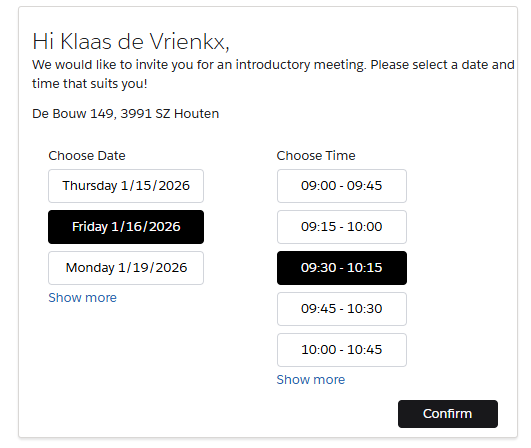
After the candidate confirms their preference, a confirmation is shown:
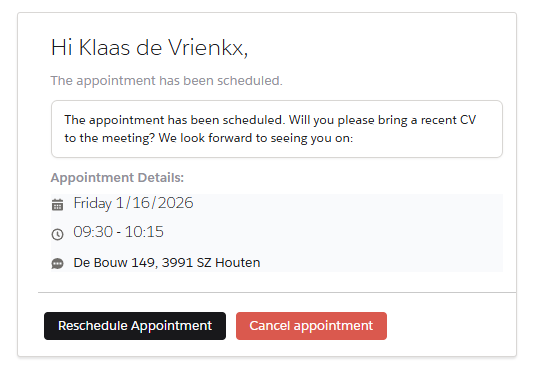
This same information is also displayed when the candidate clicks the appointment link again via the email.
Rescheduling an appointment
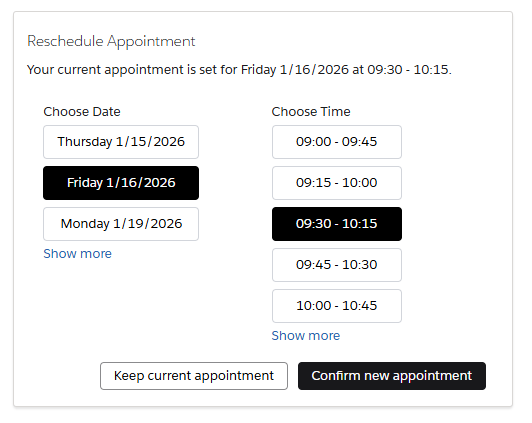
When a candidate clicks the Reschedule appointment button, the current date and time are shown first, followed by available alternative time slots.
Preventing double bookings
Cancelling and rescheduling appointments are handled within a single transaction. If a time slot has been selected by someone else in the meantime, the following message is shown:
“Sorry, this time slot is no longer available.”
Cancelling an appointment
When clicking the Cancel appointment button, a clear confirmation prompt is displayed.
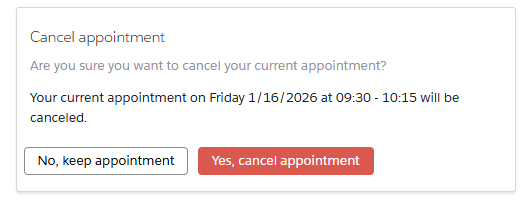
The candidate can choose between:
-
No, keep appointment
-
Yes, cancel appointment
After cancellation, the appointment is removed, the request status is updated to Cancelled by candidate, and the candidate receives a cancellation email.
In the portal, only the message “Your appointment has been cancelled.” is shown.
In summary, these are the main improvements:
-
The current appointment is not immediately removed; candidates can calmly select an alternative
-
The Confirm new appointment button only becomes active once a new date and time are selected
-
The original appointment is only removed after the candidate confirms the new appointment
-
Two emails are sent automatically:
-
one confirmation of the cancellation of the original appointment
-
one confirmation of the new appointment
-
-
Using the Keep current appointment button, the candidate closes the window without making changes
Set-up
If you are already using the appointment scheduling functionality, we recommend making one adjustment. In the portal’s theme settings, set the font size for the mobile view to a maximum of 13 px.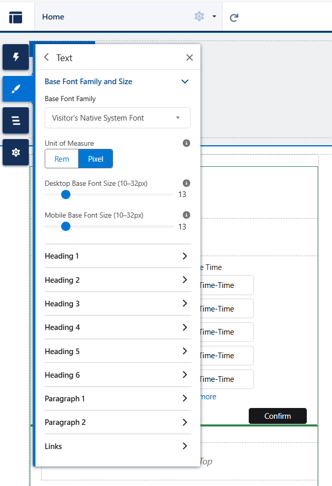
After republishing the Experience Cloud Portal, the new logic and layout are automatically applied. If you do not yet have a configuration and would like to use this functionality, please refer to the relevant guide:
⬇️ Download Setup document 'Appointment Scheduling'
Feature Implementation Time
-
Standard implementation: 1–2 hours
Other features in the 2026-01 release
🔗 Please find an overview of other features in this release here.