/Afbeeldingen/Mysolution%20Logo.png?width=150&height=113&name=Mysolution%20Logo.png)
Introduction
Previously, the automatic batch for privacy reminders could unintentionally send large volumes of emails due to unforeseen database changes. Since this process directly affects communication with candidates, there was a need for an additional control mechanism. With this new feature, organisations can add an approval step before privacy emails are actually sent.
Who is this feature relevant for?
- Functional administrators
- Privacy Officers / Compliance staff
- Recruiters
Benefits at a glance
- Prevent unintentional mass sending of emails caused by database errors.
- Full control over which candidates receive a privacy reminder.
- Clear insight into the status of GDPR requests per candidate.
Feature explanation
We have introduced a failsafe for sending privacy reminders. By activating a new setting, emails are no longer sent directly by the automatic batch. Instead, candidates who are eligible for a reminder first receive the status 'Pending'. An authorised user can then review this list and approve or reject it in one go.
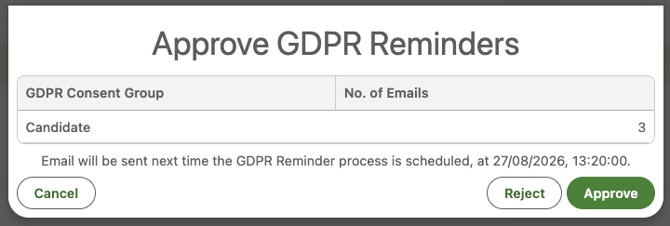
When the approval step is activated, emails are only sent after they have been explicitly approved and the batch runs again. The most current status of the candidate is always checked at that point; if a candidate has already given consent via the portal in the meantime, the reminder is automatically cancelled. This ensures candidates never receive unnecessary or duplicate requests.
In addition, new fields have been added to the contact record to make the process transparent. Users can now see directly which type of consent was requested (initial or repeat consent), what the current status is, and by whom and when a request was processed. The approval settings are also now taken into account when manually sending a reminder via the contact record.
Set-up / Implementation time
The functionality can be activated via the Privacy Settings in the Custom Settings by ticking the option 'Approve Sending Privacy Reminders'. In addition, a public group must be configured for the users who are authorised to perform the approvals.
Setup: Manual configuration of Workflow Action
To activate the new GDPR approval functionality within workflows, a new value must be added to the picklist of the Action field on the Workflow Action Setup object.
- Object:
Workflow Action Setup(msf__Workflow_Action_Setup__c) - Field:
Action(msf__Action__c)
Add the following value to the picklist:
| API Name (Value) | Label (NL) | Label (EN) |
|---|---|---|
| GDPR_REMINDER_APPROVAL | GDPR herinnering goedkeuring | GDPR Reminder Approval |
Create Workflow Definition
Via Setup, Custom Metadata Types, create a Workflow Definition so that privacy reminders can be approved via a workflow tile.
Below are the key fields to fill in, with a suggested query and a field list to display.
- Query (example):
SELECT Id, Name, msf__GDPR_Email_Processed_By__c, msf__GDPR_Email_Processed_On__c, msf__GDPR_Email_Status__c, msf__GDPR_Email_Type__c FROM Contact WHERE msf__GDPR_Email_Status__c != null- Extended fields to display (example):
Name, msf__GDPR_Email_Processed_By__c, msf__GDPR_Email_Processed_On__c, msf__GDPR_Email_Status__c, msf__GDPR_Email_Type__c
- Public groups:
Make sure the relevant public group is filled in.
Create Workflow Action Setting
Via the App Launcher, Workflow Action Settings, create a Workflow Action Setting. As the "Action" type, choose the new GDPR Reminder Approval option you added to the picklist. Refer to the Workflow Definition you created.