/Afbeeldingen/Mysolution%20Logo.png?width=150&height=113&name=Mysolution%20Logo.png)
Introduction
The Skills board is widely used for managing and assigning skills within persons, vacancies, and accounts. To improve daily use, several optimizations have been implemented focusing on the order, interaction, and searching of skills.
These improvements provide, among other things, more control for application administrators and enhanced search functionality for end users.
The improvements are available within Candidate/Contact, Vacancy, and Account contexts, including use in Flow and Experience Cloud portal environments.
Who is this feature relevant for?
This feature is relevant for:
-
Everyone working with skills of persons, vacancies, and accounts
-
Application administrators managing skill definitions
-
Recruiters and consultants assigning and maintaining skills
Key benefits
- Full control over the order of skill definitions
- Clearer interface by allowing only one open skill definition at a time
- Improved accessibility of skills when searching within folder structures
- Faster insight into essential properties of a skill definition
Feature explanation
Configurable order of Skill Definition Blocks
You can now configure the order in which skill definitions are displayed in the Skill Board Matrix component.
-
The order is determined by the position of the skill definition in the setup screen
-
Left and right arrow buttons have been added in the setup screen to change the position
-
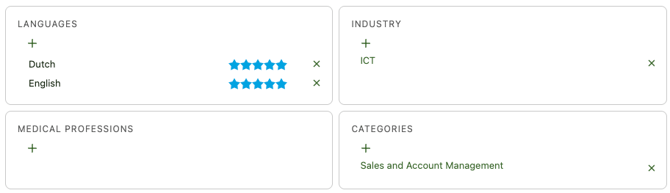
In the Skill Board Matrix component, skill blocks are always displayed two side by side
The configured order is stored in the background and automatically applied in the Skill Board Matrix. Below is an example with six skill definitions and their display.
Example
Display in Skill Definitions (Setup screen):
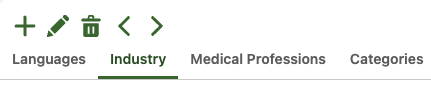
Using the left and right arrow buttons, you can adjust the order.
The order shown above is applied as follows in the Skill Board Matrix:
Only one open Skill Definition at a time
When assigning skills, we now prevent multiple skill definitions from being opened simultaneously.
-
Opening a second skill definition automatically closes the previously opened one
-
This behavior is identical to using the Cancel button
This keeps the interface clear and consistent.
Improved skill search within folders
The search functionality within skill definitions has been improved, especially when using folders.
-
All folders and skills matching the search term are displayed
-
Folders containing matching skills are automatically expanded
-
Folders without direct matches remain collapsed
-
You can expand any folder to view and select all underlying skills
This makes skills easier to find and assign, even in more complex skill structures.
Overview of Skill Definition properties
To provide faster insight into key settings, a new information block has been added to the skill definition.
-
An overview with key data is shown at the top of the skill definition page
-
The information block is visually distinct and easy to read
-
Editing the skill definition remains possible via the existing edit functionality
This avoids unnecessary opening of edit screens and speeds up the review of skill settings.
Set-up / Feature Implementation Time
-
Simple configuration: max. 15 minutes
This time estimate is based on changing the order of skill definitions. The actual implementation time depends on the number of skill definitions.