/Afbeeldingen/Mysolution%20Logo.png?width=150&height=113&name=Mysolution%20Logo.png)
In the previous Equal Pay release, we introduced the functionality to batch clone placements to a new collective agreement. In this release, several improvements have been made to this functionality.
-
When selecting placements, an additional Status column has been added. This allows you to immediately see the status of the relevant placements.
-
On the progress page, an additional Scope column has been added. This column shows the applied filter Team, Project, or Account, making it easy to see at a glance which filters were used for the different clone actions. By hovering over the information icon (i), you can also view the other applied filters.
-
On the progress page, the status Completed but incomplete is used for actions that have finished, but for which some placement details still need to be completed. From now on, this status is automatically updated to Completed as soon as the placement details for all placements within that action have been completed. This makes the progress page more suitable as a work queue and provides a more accurate overview.
-
If an error has occurred for a placement, this is visible when clicking Show results on the progress page. An additional column with an information icon (i) has been added. By hovering over this icon, you will see additional information about what happened, where the issue occurred, and tips on how to resolve the problem.

-
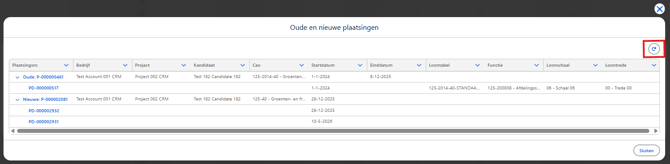
Refreshing the details in the results now happens automatically when opening the detail view. In addition, a Refresh button has been added. This makes it quicker to see when a placement has been completed.