/Afbeeldingen/Mysolution%20Logo.png?width=150&height=113&name=Mysolution%20Logo.png)
Within Mysolution, the driving distance between two addresses is calculated, for example between a candidate’s home address and the project location. Until now, this was done using the legacy Google Distance Matrix API. Google is introducing a successor: the Google Maps Routes API.
With this feature, we add support for the new Routes API, while the existing Distance Matrix API remains available. Google has announced that the legacy API will be deprecated. Customers can decide themselves when to switch, without any risk of disrupting existing processes.
Who is this feature relevant for?
This feature is relevant for:
-
Organizations that use travel distances in placements and Mysolution Workforce processes
-
Customers using Google Maps integrations within MSR and Combi
Key benefits
-
Retention of existing Distance Matrix API functionality
-
Support for the new Google Maps Routes API in the existing distance calculation
-
Improved error handling and clear messages in case of configuration issues
-
Distance calculation also available via Flow actions
Feature explanation
Choice between two Google Maps APIs
The system now supports two ways to calculate driving distances:
-
Legacy Google Distance Matrix API
-
New Google Maps Routes API
A setting allows each organization to determine which API is active. This ensures that the current functionality remains unchanged for customers who have not yet updated their Google configuration.
Technical operation
When using the Routes API:
-
The ComputeRoutes endpoint is called
-
Driving mode is always used
-
Distance and duration are stored in the same Salesforce fields as before
In addition, for all Google Maps calls (both legacy and new), street and postal code are now also included when available. This prevents incorrect distance calculations for locations with the same name or incomplete addresses.
Distance calculation via Flow
Distance calculation is now also available as a Flow component:
Calculate Distance (Routes API) / apex-msf_DistanceCalculatorFromFlow
Input
-
From address (text)
-
To address (text)
Both parameters must contain a valid address, postal code and/or city, optionally combined with a country description, to calculate the correct distance.
Output
Distance (one-way, in kilometers). The calculation is always based on car travel.
Set-up / Implementation Time
Before using the new service, several steps must be completed:
-
Activate the Routes API in the Google Cloud Project. Refer to the Google documentation: https://developers.google.com/maps/documentation/routes/migrate-routes
-
Add the managed Named Credential GoogleRoutes to the relevant Permission Set(s) under External Credential Principal Access. Without this permission, users will receive an error
-
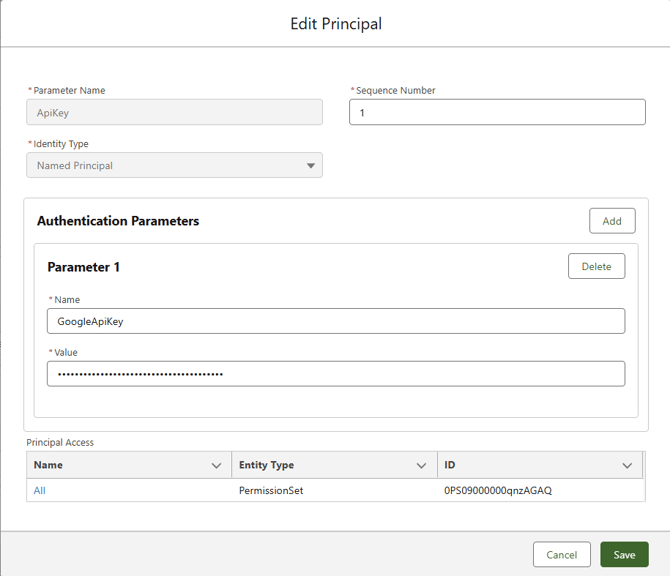
Set the API key of the new service in the managed Named Credential GoogleRoutes. Go to Setup, Named Credentials. In the Authentication section, click the External Credential GoogleRoutes. In the External Credential, modify the current ApiKey parameter in the Principals section. Add a new parameter with the value GoogleApiKey. In Value, enter the API key received from Google:
-
-
A new setting has been added under Setup, Custom Settings, Maps Settings: Use new Google Maps Routes API. When this setting is enabled, the Routes API is used.
-
Without these steps, the system will automatically continue using the legacy Distance Matrix API.
Other features in the 2026-02 release
🔗 Please find an overview of other features in this release here.